Python virtual environments
Each project you work on should ideally have it's own environment.
Within Python, you can install software from the web and you can use modules and frameworks developed by other programmers.
Imaging this situation.
You're a programmer, working on two projects. Web App #1 and Web App #2
For Web App #1 you're using framework version #10 while for Web App #2 you're using framework version #8.
How would you work on both on the same machine?
/------------------/     /----------------/
|   Web App # 1    |     |   Web App # 2  |
|                  |     |                |
|  Framework # 10  |     |  Framework # 8 |
|                  |     |                |
|                  |     |                |
|                  |     /----------------/
/------------------/
The answer to this is that you can use Python virtualenvironments to keep these projects separate and install different versions of your framework, one in each folder.
Windows console
To start off, we need to get a little more familiar with the windows console
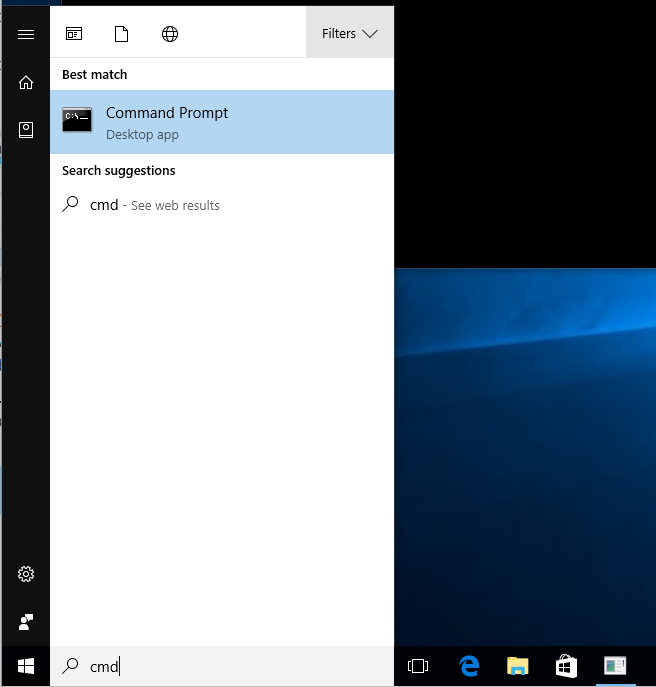
dir- lists contents of foldermkdir <Directory Name>- creates new foldercd <Directory Name>- enters a foldercd ..- enters a folder above the current one
Windows 10 makes it easy to get to a console. Just open your project folder, then click <Shift> + <Right Click> and select the option Open command window here.
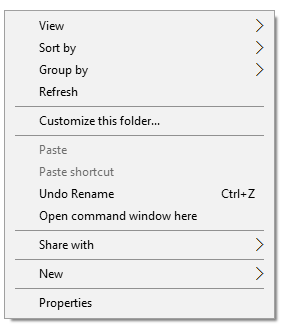
Setting up Virtual environment
Open up your console.
First, type python -V (lowercase) to make sure that you can access the Python command from your console.
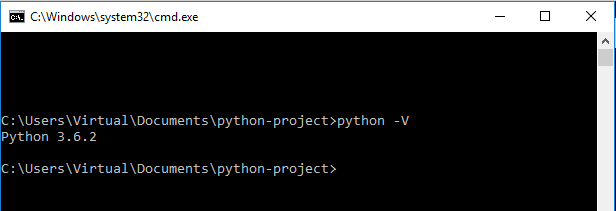
You should see the current version of Python on your system.
If that works, you can proceed. The first command to execute is the one to create the virtual environment.
Creating a virtual environment
python -m venv env
When it finishes, you should have a new folder, env. This folder will hold any external libraries that you install.
Activating a virtual environment
To use the environment, you need to execute this command on Windows:
env\Scripts\activate.bat
or MacOS or Linux:
source env/bin/activate
Once you've done this, you're now in a Python virtual environment
In order to deactivate your virtual environment, run the command
Windows:
env\Scripts\deactivate
MacOS or Linux:
deactivate
Installing dependencies with Pip
Python has a tool for installing software from the web called "Pip." You invoke it from the console.
First, you need to open a console in your project folder, then activate your virtual environment.
Then, you run the pip command.
pip install requests
Installing Wheels
You should have copied the folder python-project to a directory on your machine as well as activated a virtual environment.
You'll have to run the following command after activating:
pip install -f windows-wheels -r requirements.txt
Or, use the provided scripts
- Windows:
install.bat - MacOS or Linux:
bash install.sh
This will install all of the dependencies in your environment.
Launching IDLE from the Console
In order to make sure IDLE can see your installed libraries, you need to launch it from the console
- Activate the virtual environment
env\Scripts\activate.bat
- Launch IDLE
python -m idlelib
Opening a web browser with Python
import webbrowser

webbrowser.open("http://sensi-sl.org")
Getting a webpage with Python
import requests

res = requests.get("http://sensi-sl.org")
for header, value in res.headers.items():
    print("Header: {}".format(header))
    print("Value: {}".format(value))
print(res.ok)
print(res.status_code)
print(len(res.text))
non_existant = "http://sensi-sl.org/a-page-that-doesn't-exist"

res = requests.get(non_existant)
print(res.ok)
print(res.status_code)
Scraping Sensi's website with Python
import requests
import bs4

res = requests.get('http://sensi-sl.org/upcoming-events/')
calendar_events = bs4.BeautifulSoup(res.text, 'html5lib')

event_titles = calendar_events.select('.tribe-events-list-event-title')

print("Found {} events on the website".format(len(event_titles)))

for title in event_titles:
    cleaned_title = title.getText().strip()
    print(cleaned_title)