Introduction to Programming
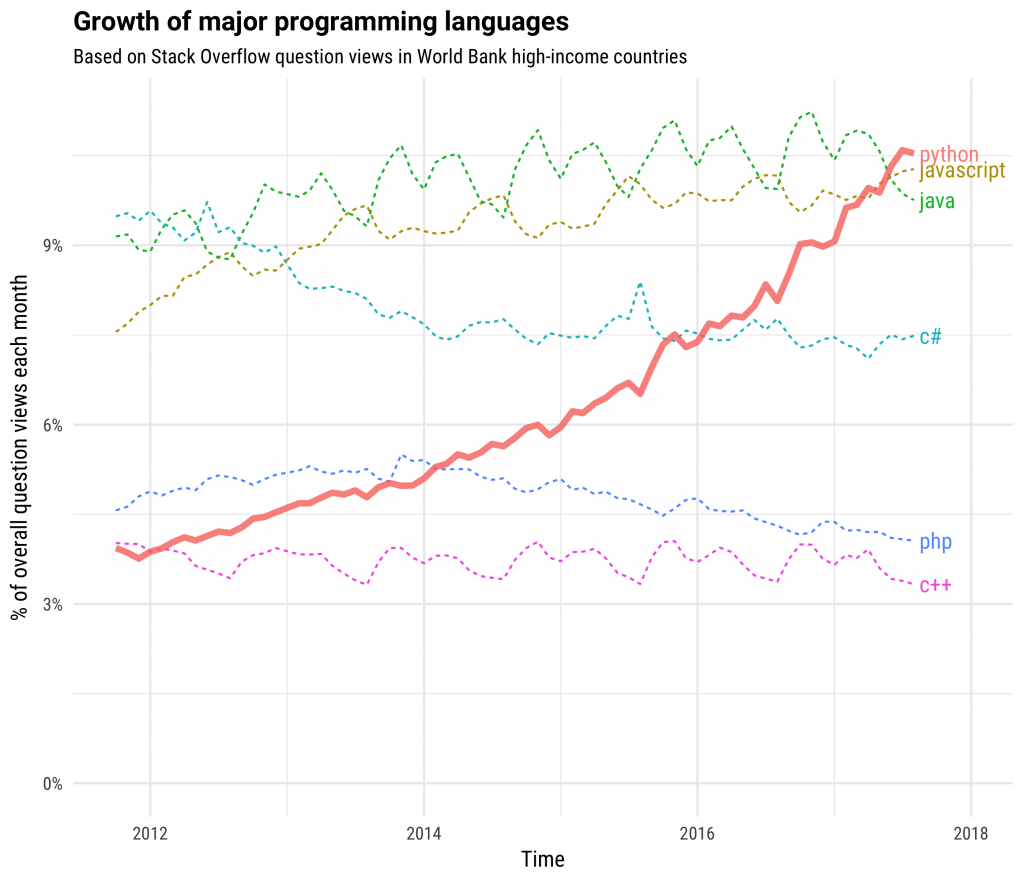
Python has been growing rapidly
Over the last 10 years, it has grown to be one of the most popular programming languages.
It recent outpaced Java and JavaScript in popularity.
What is Python good at?
- Web and Internet Development
- Scientific and Numeric
- Education
- Desktop GUIs
- Software Development
- Business Applications
Web Applications

Scientific Programming
This Presentation
This presentation was created using tools built in Python.
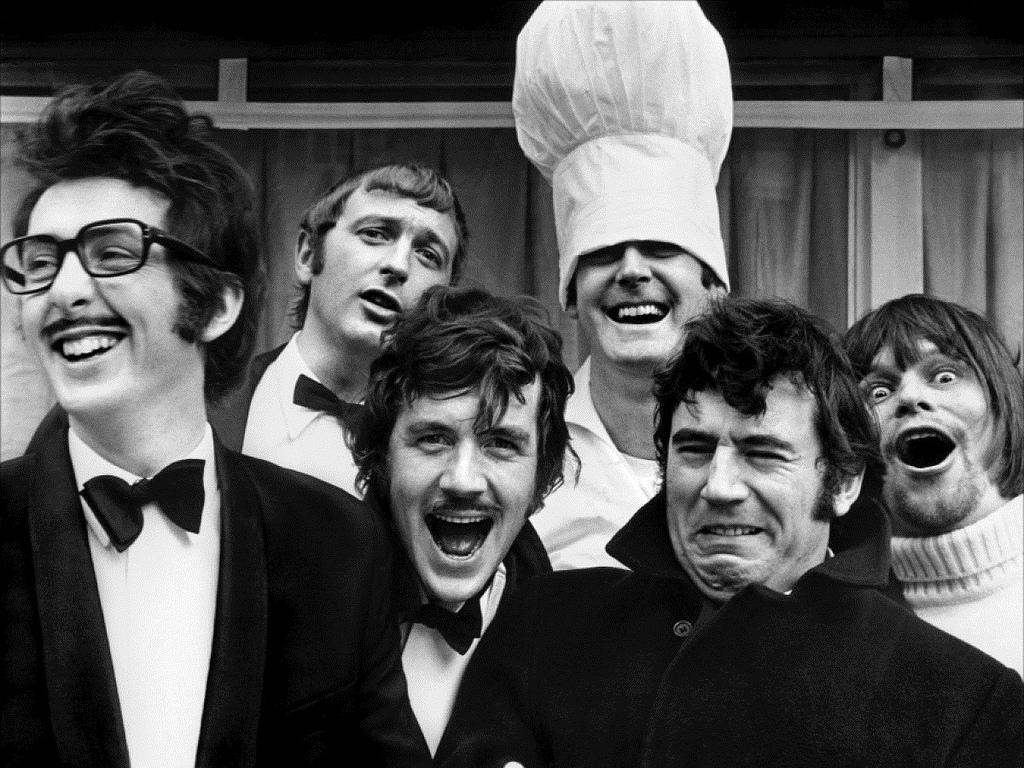
Where does the name Python come from?
Overview of Today
- Motivations and goals for the course
- Overview of programming
- Overview for setting up Python
- Diving into Python
Motivations and Goals
By the end of the course:
- Start up and use Python
- Write basic scripts
- Read documentation and learn more
- Be able to work through additional material
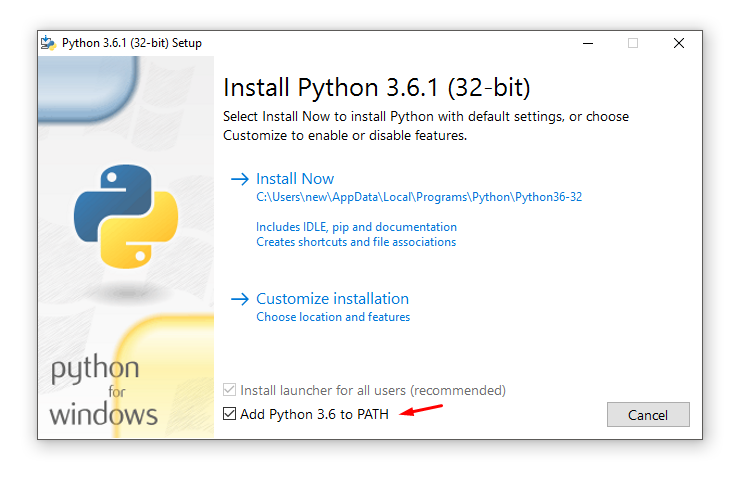
Install Python
Go to the download link and pick the correct version for your operating system
If you have a "32-bit" operating system, install python-3.6.3.exe
If you have a "64-bit" operating system, install python-3.6.3-amd64.exe
When you install it, make sure to check the option to add Python 3.6 to your PATH.
Starting Python
- Code in files and scripts
- Editor
- Console
- Shell
Running the Python console
To start the Python console on Windows, go to Start -> Python 3.6 -> IDLE
Python Terms
This is the Python prompt.
You type the commands you see into it
This is a Python comment. Any line that begins with '#' is a comment.
Comments don't impact your code and are just for reading.
# Comments are notes for yourself about your code
This is an expression which is the basic unit of instruction.
An expression consists of values (like 2) and operators (like +).
Pressing <enter> evaluates the expression.
The result of an expression is a value.
2 + 2
This is an error. If the Python interpreter can't understand
your expressions, or there is another issue, there will be an error.

Overview of variables
- Numbers
- Strings
- Boolean
None- Lists
Variables can be "assigned" with the = operator.
name = "Cass"
occupation = "Programmer"
age = 33
Numbers
- Integers (... -2, -1, 0, 1, 2, 3 ... 100 ...)
- Decimal (3.14, 96.6, 0.01)
age = 33
print(age)
1 + 1
19 - 8.5
12 * 12
# Power operator
2 ** 4
100 / 6
# Fraction discarding the remainder
100 // 6
# "Modulus" or "remainder"
7 % 5
birth_year = 1980

this_year = 2017

age = this_year - birth_year

print(age)
Strings
- Text
- Names
- Paragraphs
- Etc
Construct strings with '
Strings support operations +, *, and %
name = "Cass"

print("Hello " + name)
Try with your own name now.
Strings also support "interpolation." You can define a template for your string and then "fill in the pieces."
message = "%s is a %s aged %d"

print(message % (name, occupation, age))
message = "{} is a {} age {}"

print(message.format(name, occupation, age))
You can also multiply a string a number of times.
name * 5
Booleans
Conditions of logic. Their values are True and False.
They support operators as well, like or, and, as well as not.
Tricky: Any non-zero variable is treated as True in logical operations.
is_human = True
is_robot = False
is_human or is_robot
is_human and is_robot
not is_robot
None is a special variable, meaning nothing
Typically it means "lack of value"
print(None)
Lists hold items in sequence
Lists are useful for holding multiple values where order matters
ages = [33, 13, 49, 65, 1]
Lists have length
len(ages)
List indexing
You can reference items of a list by number, called the index.
0 is the first element while len - 1 is the final element.
ages
print(ages[0])
print(ages[len(ages) - 1])
print(ages[-1])
Overview of methods of control
if/else- decision & logicfor- doing something over and overwhilebreak- breaking or continuingforloopscontinue
(Detour) Significance of whitespace in Python
In Python, indentation with whitespace marks a "block" of code.
The convention is to use 4 spaces for this indent.
In IDLE, pressing <TAB> produces spaces rather than a tab.

if is used for deciding
if <Boolean>:
____<Expression if True>
else:
____<Expression if not True>if is_human:
print("{} is a human".format(name))
else:
print("{} is a robot".format(name))
if 1:
    print("This 'if' evaluates to 'True'")
if 0:
    print("This 'if' evaluates to 'False'")
if name:
    print("This 'if' evaluates to 'True'")
if None:
    print("This 'if' evaluates to 'False'")
for loops, doing something over and over
Use the for statement to do things a fixed number of times (typically known ahead of time).
for supports iterating over various structures like lists and dictionaries.
To print something 7 times, use:
for i in range(7):
    print("This will appear 7 times")
for i in range(5):
    print("Counting...{}".format(i))
They're also useful for accumulating things.
Below, += means "add and then set equal to."
str means "convert to string." Because numbers is a string, we can only add strings to other strings. We cannot add a number and a string.
numbers = ''

for i in range(10):
    numbers += str(i)

numbers
while loops
Use while loops to do something multiple times.
Usually used when you don't know the number ahead of time.
# Add numbers until they are more than 100

total = 0
number = 0

while total < 100:
    number += 1
    total += number

print("Adding up to {} produced {}".format(number, total))
break, continue, pass
for i in range(10):
    print("{} before break".format(i))
    if i > 4:
        # `break` brings us out of a `for` loop prematurely
        break
    print("{} after break".format(i))
sum_of_evens = 0

for i in range(5):
    print("Testing the number {}".format(i))

    # If the number is even
    if i % 2 == 0:
        print("{} is an even number".format(i))
        sum_of_evens += i
    else:
        continue

    print("The total is now {}".format(sum_of_evens))
The pass statement does nothing. It's used for when you need an expression but wish to do nothing.
The following code continues forever.
#while True:
#    pass
If you put code above in your prompt, you can press <ctrl> + C or <ctrl> + Z to cancel it.
for n in range(2, 10):
    for x in range(2, n):
        if n % x == 0:
            print(n, 'equals', x, '*', n//x)
            break
    else:
        # loop fell through without finding a factor
        print(n, 'is a prime number')
Functions
Functions allow you to define behavior to execute later one.
They're useful for abstracting code.
def say_hello(name):
    print("Hello, {}".format(name))

say_hello("Cass")
print("Hello, {}".format("Cass"))
print("Hello, {}".format("Morris"))
print("Hello, {}".format("Mariatu"))
print("Hello, {}".format("Mohamed"))
print("Hello, {}".format("Bockarie"))
print("Hello, {}".format("James"))
print("Hello, {}".format("Samuel"))
def say_hello(name):
    print("Hello, {}".format(name))

say_hello("Cass")
say_hello("Morris")
say_hello("Mariatu")
say_hello("Mohamed")
say_hello("Bockarie")
say_hello("James")
say_hello("Samuel")
def say_hello(name):
    print("Kushe-o, {}".format(name))

say_hello("Cass")
say_hello("Morris")
say_hello("Mariatu")
say_hello("Mohamed")
say_hello("Bockarie")
say_hello("James")
say_hello("Samuel")
Overview of data structures
- Lists
- Dictionaries
- Tuples
- Sets
Lists
Lists contain sequences of items.
names = ["Morris", "Bockarie", "Mariatu", "Fodi"]
You can add lists.
places = ["Sensi", "NP", "Total", "Raza"]
names + places
len(names)
names.append("Cass")
names
languages = ["Python", "Java"]

languages.extend(["Javascript", "HTML"])
languages
for l in languages:
    print("I want to learn {}".format(l))
They support "list comprehensions"
numbers = range(10)

[i + 10 for i in numbers]
Lists (and other structures) support the in operator.
names
"Morris" in names
if "Morris" in names:
    say_hello("Morris")
Dictionaries
Dictionaries allow you to put multiple pieces of information into a single structure.
{"name": "Cass", "age": 33, "occupation": "programmer"}
person = _
person['name']
person['occupation']
Tuples
Tuples are like "lists of fixed size." You cannot add to them or extend them.
point = (1, 2)
print(point)
Sets
Sets are groups of items. A set contains no duplicates.
numbers = {1, 2}
numbers.update({10})
numbers
numbers.update({10})
numbers.update({1})
numbers
Job Interview Exercise
This is an actual job interview exercise, usually the first one in a round of interviews.
Write a program that prints the numbers from 1 to 100. But for multiples of three print “Fizz” instead of the number and for the multiples of five print “Buzz”. For numbers which are multiples of both three and five print “FizzBuzz”.
For printing, use print.
For multiples, use n % m == 0. For instance, since 10 is an even number, then
10 % 2 == 0 evaluates to true.
Caesar Cipher Exercise
Create a version of the "Caesar Cipher".
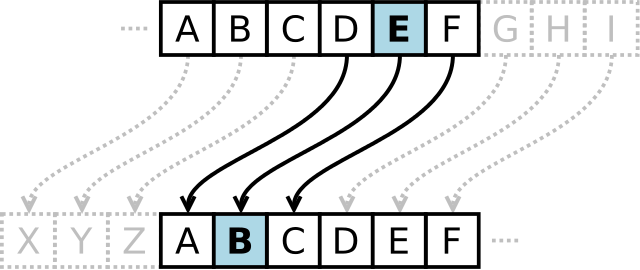
The code would be a correspondence between plain letters and encoded letters:
Plain:    ABCDEFGHIJKLMNOPQRSTUVWXYZ
Cipher:   XYZABCDEFGHIJKLMNOPQRSTUVW
so that a message encoding would be:
Plaintext:  THE QUICK BROWN FOX JUMPS OVER THE LAZY DOG
Ciphertext: QEB NRFZH YOLTK CLU GRJMP LSBO QEB IXWV ALDThe follow cells change the code block prompts so that they look like the standard IDLE prompt.
They need to be slide type "Notes" to work.
%%HTML
<style>
.code_cell  .input_prompt:after {
    content: '>>> ';
}
</style>
%%javascript

$('.code_cell .input_prompt').html("");
$('.output_area .prompt').html("");